Montega Typeface Review: Elevating Digital Brand Identity
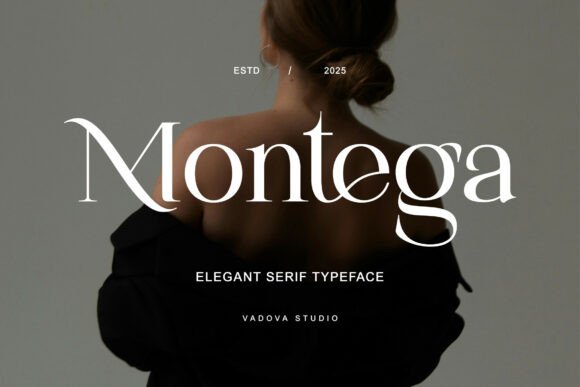
I was staring at a blank hero section on a new client’s boutique e-commerce site, trying to find that perfect balance between luxury and readability. The design felt flat. It lacked the tactile, editorial quality I knew the brand needed. That’s when I pulled Montega into Figma. As soon as I placed it over the high-resolution product imagery, the entire layout shifted. Montega is a modern serif typeface that blends elegant luxury with a feminine and sophisticated aesthetic. With its graceful curves, high contrast strokes, and delicate serifs, it embodies the essence of what we were trying to achieve: a polished, high-end digital experience without sacrificing usability.
In this review, I’ll walk you through how I integrated this font into a real-world web project, why it stands out among other Serif Fonts, and practical tips for using it effectively in your own digital designs.
Why Montega Works for Modern Web Headers
When selecting Serif fonts for website headers, the biggest challenge is often legibility at large sizes versus visual impact. Montega solves this by offering a striking display presence that remains crisp on screens. Unlike traditional old-style serifs that can feel heavy or dated, Montega feels contemporary. Its high contrast strokes create a sense of movement and rhythm, guiding the eye naturally across headlines.
In my project, I used Montega for the main H1 tag on the landing page. The font’s delicate serifs added a touch of refinement that paired beautifully with the minimalist UI elements. It didn’t compete with the photography; instead, it framed it. For designers looking to establish immediate brand authority, choosing a premium font like Montega signals attention to detail. It tells the visitor that the brand cares about aesthetics, which subtly increases trust before they even scroll down the page.
Visual Hierarchy and Scanning Behavior
One of the most underrated aspects of typography is how it influences scanning behavior. Users rarely read every word on a landing page; they scan. Montega’s distinct character shapes make headings stand out clearly against body text. By pairing Montega with a clean, neutral sans-serif font for paragraphs, I created a clear visual hierarchy. The eye jumps from the elegant Montega headline to the functional body copy seamlessly. This contrast helps users digest information faster, reducing bounce rates on content-heavy pages like course sales sites or detailed service descriptions.
Montega for Boutique E-Commerce and Lifestyle Brands
The niche for Montega is clear: brands that want to project sophistication. I tested this font extensively on a mock-up for a women’s fashion accessory store. The goal was to move away from the generic, blocky fonts common in fast-fashion retail and toward something more timeless. Montega’s feminine aesthetic made it an ideal choice for product titles and collection names.
Using Montega in online shop banners allows designers to inject personality without cluttering the interface. Because the font has a strong structural integrity, it holds up well when overlaid on images with varying lighting conditions. However, I found that it performs best when there is sufficient contrast—either a dark background with light text or a light overlay on darker product shots. It adds a layer of editorial flair that elevates simple product grids into curated galleries.
- Product Titles: Use Montega Regular or Medium for clear, attractive naming.
- Sale Banners: The bold weights create urgency while maintaining elegance.
- Navigation Labels: Smaller caps in Montega can add a subtle luxury touch to menus.
Typography Pairing Strategies for Digital Layouts
A common mistake when using decorative Serif fonts is letting them dominate the entire page. To keep a website readable and accessible, font pairing is essential. In my workflow, I pair Montega with geometric sans-serifs like Inter, Helvetica Now, or Poppins. This combination leverages the strengths of both typefaces: Montega provides the emotional hook and brand identity, while the sans-serif ensures clarity and ease of reading for longer texts.
For a coaching website redesign, I used Montega for section headers and quotes. The rest of the content remained in a highly legible sans-serif. This approach kept the site feeling personal and inviting (thanks to Montega) while ensuring that complex coaching methodologies were easy to understand. When designing for mobile, this pairing strategy becomes even more critical. Small screens require generous spacing and clear distinction between heading levels. Montega’s x-height and letter spacing are optimized for screen rendering, making it a reliable partner in responsive design systems.
Handling Dark Mode and Image Overlays
Modern web design increasingly relies on dark mode interfaces and full-screen image backgrounds. Montega’s high contrast strokes can sometimes lose definition if not handled carefully on dark backgrounds. My recommendation is to increase the font weight slightly (using Bold or Black variants) and ensure ample letter-spacing. On light backgrounds, the delicate serifs shine, so lighter weights work beautifully here. Always preview your font choices on actual devices, not just desktop monitors, to check how the thin strokes render on different pixel densities.
Technical Considerations for Web Implementation
Before committing to any commercial font, checking the technical specs is crucial for web performance. Montega comes in a comprehensive set of weights and styles, which is excellent for creating nuanced typographic scales. When implementing Montega on a website, consider using WOFF2 formats for optimal loading speeds. Since Montega is a display-oriented font, it shouldn’t be loaded for every single piece of body text, as this can bloat the file size and slow down initial paint times.
Instead, load it selectively via CSS @font-face rules targeting specific classes (e.g., .heading-montega). This technique keeps the site fast while still delivering the premium look. Also, verify multilingual support if your audience is global. While Montega covers standard Latin characters beautifully, checking for extended language support ensures consistency across international markets. Finally, always review the commercial license terms. If you are building a site for a client or selling digital products, ensure your license covers the number of page views or end-users to avoid legal issues later.
Final Verdict: Is Montega Worth the Investment?
In a market saturated with free and cheap fonts, Montega offers a distinct advantage: character. It isn’t just another serif; it’s a tool for building a memorable brand identity. Whether you are designing a portfolio homepage, a high-ticket course landing page, or a creative agency site, Montega brings a level of polish that is hard to replicate. It bridges the gap between traditional print elegance and modern digital functionality. If you are a designer looking to elevate your projects with a typeface that speaks volumes about quality and taste, Montega is a powerful addition to your toolkit.